Spatial recognition
Recognises walls, doors, windows and levels to assist BIM element generation.
This advanced feature requires activation in LCC Studio.

XGRIDS
Connect LCC reality models with Revit for existing-condition modelling, element checks and team coordination.
Explore capabilities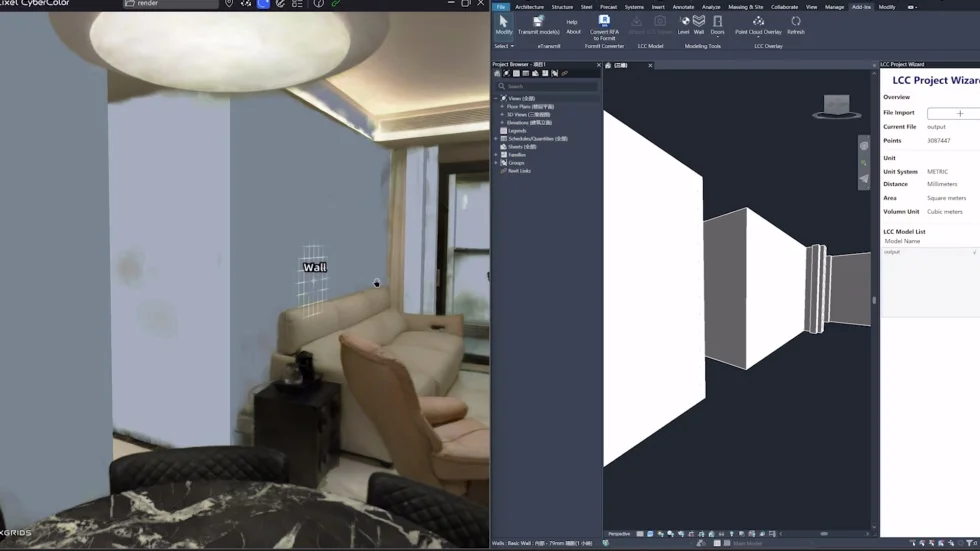
LCC for Revit / 01
Recognises walls, doors, windows and levels to assist BIM element generation.
This advanced feature requires activation in LCC Studio.
Links BIM and LCC spatial models to provide site context.
Synchronises Revit and LCC Viewer views to locate and review discrepancies.
Groups scan data by building elements to clarify spatial relationships.
LCC for Revit / 02
Capture the building with a Lixel scanner.
Reconstruct in LCC Studio; enable Spatial Recognition for automatic element generation.
Use scene references and recognition results through the plugin. Without Spatial Recognition, use manual Draw mode.
LCC for Revit
Specifications reflect the stated test conditions. Features depend on software version, device and licence; the quotation confirms your configuration.
04 / Enquire
Tell us about your site, area and deliverables. We will confirm equipment, software, accessories and a quotation.
XGRIDS
LCC for Revit